AWS EKS Volume Architecture in a Stateful App in Multiple AZs
AWS EKS Volume Architecture in a Stateful App in Multiple AZs
https://faun.pub/aws-eks-volumes-architecture-in-a-statefull-app-in-multiple-azs-6ca1b05f80eb
[

](https://medium.com/@jportasa?source=post_page—byline–6ca1b05f80eb—————————————)
I will try to describe the volumes architecture for a kubernetes AWS EKS for an statefull application that needs persistent data in H.A.
We should not use EBS
Consider that an EBS volume is located in only one AZ, therefore, a POD that moves through the cluster to a EKS node located in a different AZ than the EBS, this POD will cannot use this PV:
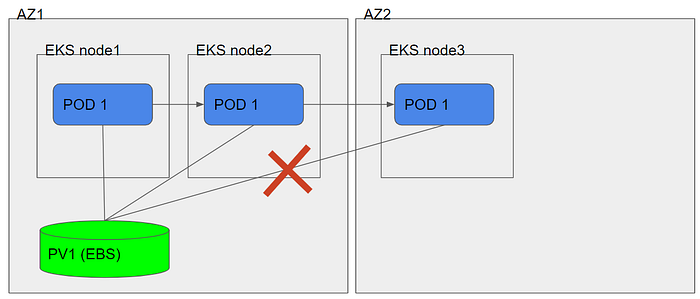
POD moving from node to node
Use EFS as Persitent volume
Our app POD’s will be in any AZ, therefore, to properly deploy the app we need a shared volume between all the POD’s.
Shared volumes cannot be EBS because EBS are not MultiAZ. So we will have to use EFS as a PV.
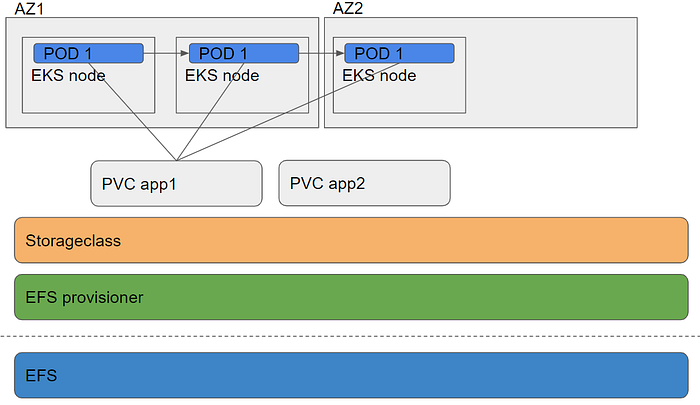
Create EFS provisioner (set your EFS variables):
kind: DeploymentapiVersion: extensions/v1beta1metadata: name: efs-provisionerspec: replicas: 1 strategy: type: Recreate template: metadata: labels: app: efs-provisioner spec: containers: - name: efs-provisioner image: quay.io/external_storage/efs-provisioner:v0.1.0 env: - name: FILE_SYSTEM_ID value: ##your-efs-id## - name: AWS_REGION value: us-east-1 - name: PROVISIONER_NAME value: eks-course/aws-efs volumeMounts: - name: pv-volume mountPath: /persistentvolumes volumes: - name: pv-volume nfs: server: ##fs-xxxxxx.efs.us-east-1.amazonaws.com## path: /
RBAC to access to EFS:
apiVersion: rbac.authorization.k8s.io/v1beta1kind: ClusterRoleBindingmetadata: name: nfs-provisioner-role-bindingsubjects: — kind: ServiceAccount name: default namespace: ns-eks-course-efsroleRef: kind: ClusterRole name: cluster-admin apiGroup: rbac.authorization.k8s.io
Storageclass definition with provisioner defined upper code section:
kind: StorageClassapiVersion: storage.k8s.io/v1metadata: name: aws-efsprovisioner: eks-course/aws-efs — -kind: PersistentVolumeClaimapiVersion: v1metadata: name: efs-wordpress annotations: volume.beta.kubernetes.io/storage-class: “aws-efs”spec: accessModes: — ReadWriteMany resources: requests: storage: 10Gi — -kind: PersistentVolumeClaimapiVersion: v1metadata: name: efs-mysql annotations: volume.beta.kubernetes.io/storage-class: “aws-efs”spec: accessModes: — ReadWriteMany resources: requests: storage: 10Gi
Now we can check the mounts in the EC2 node:
We SSH to the EKS node that the POD “EFS-provisioner-XXX” is attached

And we see that this directory has 2 subdirectories, one for each PV:

Final notes
An EFS file system is a NFS file system. Some applications such as databases require a block device and may not work with an EFS file system. In addition, EFS is much slower than EBS.
EFS does not support snapshot. You need to setup a rsync job for backup.
Follow us on Twitter 🐦 and Facebook 👥 and join our Facebook Group 💬.
To join our community Slack 🗣️ and read our weekly Faun topics 🗞️, click here⬇